
Checklist
The Digital Preservation Lifecycle Checklist
Digital preservation is an ongoing lifecycle, not a one-time project. Institutions managing digital collections across departments and sites need a consistent, standardized approach to protect their holdings for the long term. Download this checklist to benchmark your institution's practices against recognized standards, from ingestion and metadata through secure storage, ongoing monitoring, and long-term accessibility.
Protect Your Digital Collections at Every Stage
Inside this practical checklist, you'll discover:
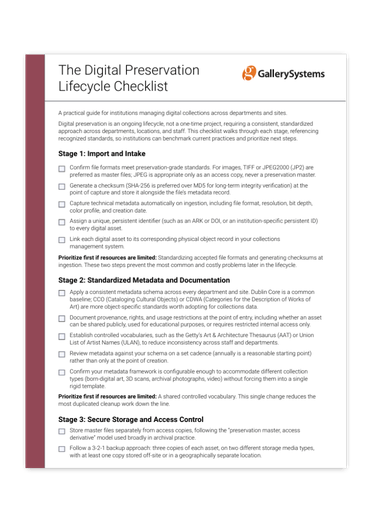
How to standardize object imports
Confirm preservation-grade file formats, generate checksums at capture, and assign persistent identifiers so every digital asset is protected from the moment it enters your system.
How to build a shared metadata framework
Apply consistent schemas and controlled vocabularies across departments and sites to reduce inconsistency and streamline collections data.
How to secure storage and manage access
Configure role-based permissions and maintain audit trails, following the 3-2-1 backup approach to safeguard master files and access derivatives alike.
How to monitor for format obsolescence
Schedule fixity checks and plan migration paths before a format becomes unreadable, protecting your holdings against undetected corruption.
How to sustain long-term accessibility and public trust
Establish disaster recovery plans, conduct internal audits, and communicate your preservation practices transparently to funders, boards, and the public.
Where to prioritize first
Practical, resource-conscious guidance for institutions ready to strengthen their digital preservation strategy, one stage at a time.
Frequently Asked Questions About Digital Preservation
What is the digital preservation lifecycle, and why does it matter for institutions with multiple departments or sites?
The digital preservation lifecycle encompasses every stage a digital asset moves through, from object import and metadata documentation to secure storage, ongoing monitoring, and long-term accessibility. For institutions with multiple departments or sites, consistency is essential. When each department follows its own informal practices, institutions risk metadata gaps, undetected file corruption, and assets that quietly become inaccessible over time. A standardized, lifecycle-wide approach, benchmarked against recognized standards, protects holdings and supports collaboration across teams.
Which file formats and standards should our institution adopt for preservation masters?
For image files, TIFF or JPEG2000 (JP2) are preferred as preservation masters. JPEG is appropriate only as an access copy and should never serve as a preservation master. Institutions should also generate a checksum, with SHA-256 preferred over MD5 for long-term integrity verification, at the point of capture, and store it alongside the file's metadata record. On the metadata side, Dublin Core offers a common baseline, while CCO (Cataloging Cultural Objects) and CDWA (Categories for the Description of Works of Art) provide more object-specific standards worth adopting for collections data.
How often should we run fixity checks and metadata reviews?
Fixity checks, which verify checksums to detect file corruption, are commonly run annually or biannually depending on collection size. Metadata should be reviewed against your institution's schema on a set cadence as well, with an annual review serving as a reasonable starting point rather than relying on point-of-creation checks alone. Undetected file corruption is one of the most common causes of irreversible data loss in digital collections, which makes a fixed schedule for fixity checks a priority for institutions with limited resources.
What does a 3-2-1 backup approach look like in practice?
A 3-2-1 backup approach means maintaining three copies of each asset, stored on two different storage media types, with at least one copy kept off-site or in a geographically separate location. This approach should follow the "preservation master, access derivative" model, keeping master files stored separately from access copies. For many institutions, the loss of a single, unbacked-up master file represents one of the most damaging and irreversible risks in the preservation lifecycle, making this a strong starting point when resources are limited.
How can the TMS Suite support consistency across departments, sites, and staff?
The TMS Suite supports every stage of the digital preservation lifecycle, providing the governance frameworks, standardized metadata, and secure access your institution needs to protect its most valuable holdings. Role-based, configurable access permissions allow registrars, curators, and IT administrators to work within appropriately scoped access, while shared metadata schemas and controlled vocabularies help departments and sites stay aligned. This consistency supports both day-to-day collaboration and long-term institutional accountability, sustaining access for generations to come.

Safeguard Your Institution's Most Valuable Holdings
The TMS Suite supports every stage of the digital preservation lifecycle, providing the governance frameworks, standardized metadata, and secure access your institution needs to protect its collections and sustain access for generations to come.